
Kubernetes and Cloud Native Security Skills Used on the Job
Kubernetes and cloud native security is the daily work of keeping clusters, containers and the code inside them safe: locking down the API server and etcd, enforcing pod security and least-privilege access, controlling network traffic, verifying images before they run and proving compliance. The Linux Foundation tests the foundations of this work at associate level.
That associate credential is the KCSA, the Kubernetes and Cloud Native Security Associate. This article does not repeat salary figures or generic motivation. It follows the security tasks a platform or DevSecOps team actually performs, explains why each one matters, and shows where each task sits in the six published exam domains, so the same reading helps on the job and in the exam room.
What does Kubernetes security work look like in an ordinary week?
Most Kubernetes security work is routine rather than dramatic. A typical week for someone on a platform team might begin with a review of admission controller denials from the weekend, to see whether a developer tried to deploy a privileged container or an image from an unapproved registry. Then comes a request to grant a new team access to a namespace, which means writing a Role and a RoleBinding that give exactly the verbs the team needs and nothing more.
Midweek brings scanner results. An image used by twenty deployments has a critical vulnerability in a base library, and someone has to decide whether to rebuild, patch or accept the risk for a short period. Later a compliance scan reports that the kubelet on several worker nodes still allows anonymous requests, and the fix has to be rolled out without disturbing running workloads. By Friday the team may be testing a default-deny network policy in a staging namespace before rolling it out more widely.
None of these tasks needs deep exploit knowledge. They need a clear picture of how the cluster is built, which component trusts which, and which built-in controls close each gap. That picture is what the associate exam checks, and it is why the credential suits developers, operators and security analysts who are new to Kubernetes as much as dedicated security engineers.
How do the 4Cs shape the way teams think about cloud native risk?
The 4Cs of cloud native security are Cloud, Cluster, Container and Code, arranged as layers where each one depends on the layer outside it. The idea is simple: strong application code cannot save a workload running in a cluster with an exposed API server, and a hardened cluster cannot save a cloud account whose credentials have leaked. Security has to be built from the outside layer inwards.
At the cloud layer, teams protect the infrastructure the cluster runs on. That means restricting access to the cloud provider's control plane, keeping node instances on private subnets, limiting which machines can reach the Kubernetes API endpoint and preventing pods from reading the cloud metadata service, which can hand out instance credentials. On premises the same thinking applies to hypervisors, physical network segments and the people who hold console access.
The cluster layer covers the Kubernetes components and their configuration. The container layer covers images, runtimes and the isolation between workloads. The code layer covers the application itself: dependencies, secrets handling and TLS between services. In the exam, the Overview of Cloud Native Security domain is worth 14% and also includes controls and frameworks, isolation techniques, artifact repository and image security, and workload and application code security.
Isolation deserves particular attention because people often overestimate it. Containers on the same node share one kernel, so a kernel exploit in one container can affect every other workload on that machine. Teams that run untrusted or multi-tenant workloads add stronger boundaries, such as sandboxed runtimes like gVisor or Kata Containers selected through a RuntimeClass, separate node pools for sensitive workloads, or separate clusters when the risk justifies the cost.
Which cluster components need hardening first?
The API server comes first because every request to the cluster passes through it. Hardening it means disabling anonymous authentication, setting the authorization mode to Node and RBAC rather than allowing everything, serving only TLS, turning on audit logging and keeping the endpoint off the public internet where possible. A misconfigured API server is the single most damaging mistake a cluster can have, because it hands an attacker the same control an administrator has.
etcd comes a close second. It stores the entire cluster state, including every Secret object, and by default those secrets are only base64-encoded, which is an encoding and not encryption. Teams enable encryption at rest through an EncryptionConfiguration file on the API server, restrict etcd so that only the API server can talk to it using mutual TLS on its client port 2379 and peer port 2380, and protect etcd backups as carefully as the database itself.
The kubelet runs on every node and exposes an API on port 10250 that can execute commands inside containers. A kubelet that accepts anonymous requests is an open door into every pod on that node. The fix is to disable anonymous authentication, use webhook authorization so the API server decides who may call the kubelet, and turn off the old read-only port 10255 if it is still enabled.
The remaining components carry quieter risks. The controller manager holds the key used to sign service account tokens, so its configuration files and credentials need tight file permissions. The scheduler and controller manager should bind to localhost rather than all interfaces. kube-proxy writes the iptables or IPVS rules that route service traffic, so its configuration must not be writable by workloads. Access to the container runtime socket, whether containerd or CRI-O, is effectively root on the node and must never be mounted into an ordinary pod.
The exam groups all of this under Kubernetes Cluster Component Security, worth 22%. Its objectives list the API server, controller manager, scheduler, kubelet, container runtime, kube-proxy, pods, etcd, container networking, client security and storage. A useful study habit is to write one sentence per component describing what an attacker gains if it is left open; once you can do that from memory, most questions in the domain become straightforward.
How do pod security, RBAC and network policies protect running workloads?
Kubernetes ships three built-in profiles called the Pod Security Standards: Privileged, Baseline and Restricted. Privileged applies no restrictions. Baseline blocks the known privilege escalations, such as privileged containers, host namespaces and most hostPath volumes. Restricted adds hardening on top, requiring containers to run as a non-root user, drop all Linux capabilities, disallow privilege escalation and use a RuntimeDefault or Localhost seccomp profile.
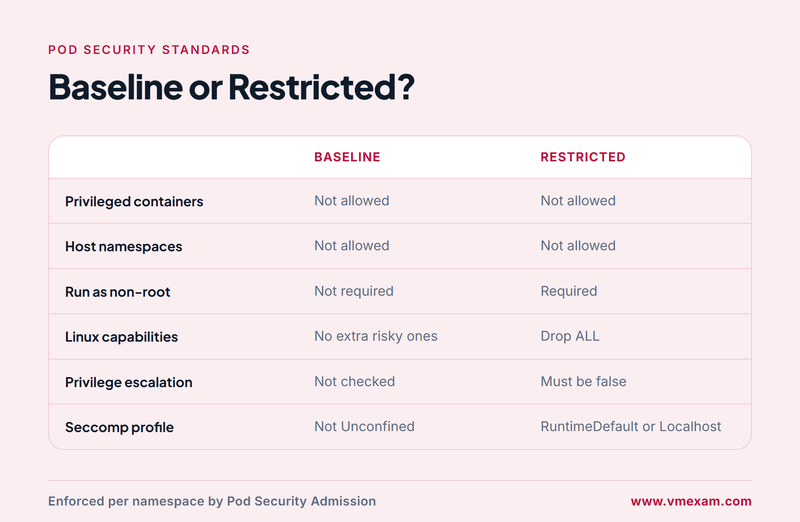
Those standards are enforced by Pod Security Admission, an admission controller built into the API server that replaced the PodSecurityPolicy resource removed in Kubernetes 1.25. Teams apply it with namespace labels such as pod-security.kubernetes.io/enforce=restricted. Each namespace can use three modes at once: enforce rejects violating pods, audit records them in the audit log, and warn returns a warning to the user. A common rollout runs warn and audit for a few weeks before switching enforce on.
Authentication and authorization are the next layer. Kubernetes has no user objects of its own; it trusts identities presented through client certificates, bearer tokens or an OpenID Connect provider. Workloads authenticate with service account tokens, which modern clusters issue as short-lived, audience-bound projected tokens. Authorization is almost always RBAC: Roles and ClusterRoles define allowed verbs on resources, and RoleBindings and ClusterRoleBindings attach them to users, groups or service accounts. The command kubectl auth can-i is the quickest way to check what an identity can actually do.
Secrets need care beyond RBAC. Anyone who can create a pod in a namespace can mount any Secret in that namespace into it, so pod creation rights are effectively secret read rights. Teams reduce exposure by keeping secrets in narrowly scoped namespaces, encrypting them at rest, turning off automatic mounting of service account tokens for pods that do not call the API, and using an external secrets manager for high-value credentials.
Network traffic between pods is allowed by default. A NetworkPolicy changes that for the pods it selects: once a pod is selected by any policy for ingress or egress, only traffic explicitly allowed by some policy can reach or leave it. Policies are enforced by the network plugin, so they do nothing on a CNI that does not support them. The usual pattern is a default-deny policy per namespace with an empty pod selector, followed by narrow allow rules for DNS and for each real dependency.
Audit logging ties the domain together. An audit policy decides what the API server records for each request, at one of four levels: None, Metadata, Request or RequestResponse. Recording secrets at RequestResponse level would write their values into the log, so teams log Secret access at Metadata level. Kubernetes Security Fundamentals carries a weight of 22% in the exam and covers pod security standards and admission, authentication, authorization, secrets, isolation and segmentation, audit logging and network policy.
How do engineers use a threat model for a Kubernetes cluster?
A threat model starts by drawing trust boundaries: the lines where data or control passes between parties that trust each other differently. In a cluster the obvious boundaries sit between the internet and the ingress controller, between a pod and the node it runs on, between namespaces, between the nodes and the control plane, and between the cluster and the cloud account. Every boundary is a place to ask who could cross it, what they would gain and which control stops them.
The exam's Kubernetes Threat Model domain, weighted at 16%, names the attacker goals to check at each boundary: persistence, denial of service, malicious code execution and compromised applications in containers, an attacker on the network, access to sensitive data, and privilege escalation. Thinking through each goal in turn is more reliable than trying to imagine attacks freely, and it mirrors how scenario questions are written.
A worked example: one compromised web pod
Imagine an attacker exploits a vulnerable library in a public web application and gains a shell inside its container. The first question is what that container can reach. If the service account token is mounted and bound to a broad role, the attacker can query the API server and list secrets. If no network policy exists, the attacker can scan every other pod and service in the cluster, including databases that were never meant to be reachable from the web tier.
Privilege escalation is the next step to consider. A container running as root with extra capabilities, or a pod that mounts the host filesystem, may let the attacker break out to the node and read the kubelet credentials. From there, persistence becomes possible: creating a CronJob or DaemonSet that keeps running after the original pod is deleted, or dropping a static pod manifest on the node, which the kubelet starts without asking the API server.
Each step maps to a control covered elsewhere in the syllabus. The Restricted pod security profile blocks root and host mounts. Disabling token automounting and tight RBAC stop the API queries. A default-deny network policy stops the lateral scanning. Resource limits and quotas stop a compromised workload from starving its neighbours, which is the denial-of-service angle. Audit logs and runtime detection show the defender what happened. Walking one scenario end to end like this is the best way to make the threat model domain stick.
What does platform and supply chain security add?
Platform security covers the services that surround the cluster rather than the cluster itself. Supply chain security is the most discussed of these, because an attacker who can tamper with an image or a build pipeline never needs to break into the cluster at all. Teams respond by building images from minimal, pinned base images, generating a software bill of materials for each build, signing images with a tool such as Sigstore cosign and verifying the signature before the image is allowed to run.
The image repository is the checkpoint for that work. A private registry with access control and vulnerability scanning lets the team block images that fail policy before they reach a node. Referencing images by digest rather than by a mutable tag such as latest guarantees that the image scanned and signed is the image deployed. Scanners such as Trivy are typically run both in the pipeline and against images already in the registry, because new vulnerabilities are published every day.
Admission control is where policy turns into enforcement. Mutating admission webhooks can add defaults such as security contexts, and validating webhooks can reject objects that break the rules. Policy engines such as OPA Gatekeeper and Kyverno let teams write rules like "only images from our registry" or "every deployment must set resource limits", and Kubernetes now also offers ValidatingAdmissionPolicy, which expresses rules in the Common Expression Language without running a separate webhook.
The rest of the domain covers the plumbing that keeps the platform trustworthy. Observability means collecting audit logs, metrics and runtime events, often with Falco watching system calls for suspicious behaviour such as a shell spawned inside a container. A service mesh such as Istio or Linkerd adds mutual TLS between services, so traffic is encrypted and each side proves its identity. PKI covers the cluster certificate authority and certificate rotation, which matters because client certificates generated by kubeadm expire after one year by default. Connectivity covers how clusters, nodes and external systems reach each other safely. Platform Security is weighted at 16% in the exam.
Where do compliance frameworks fit into daily security work?
Compliance frameworks turn good intentions into checkable lists. The CIS Kubernetes Benchmark is the one most teams meet first: it lists concrete settings for the API server, etcd, kubelet and other components, and the open source tool kube-bench checks a cluster against it automatically. Many of the hardening steps described earlier in this article, such as disabling anonymous kubelet access, come straight from that benchmark.
Broader frameworks set the policy context. NIST Special Publication 800-190 covers application container security, and the Kubernetes Hardening Guidance published by the NSA and CISA gives practical recommendations for government and regulated environments. Threat modelling frameworks such as STRIDE and the MITRE ATT&CK matrix for containers give teams a shared vocabulary for attacker techniques, which makes threat models easier to review and compare.
Supply chain compliance has its own frameworks. SLSA, short for Supply-chain Levels for Software Artifacts, defines increasing levels of build integrity and provenance. SBOMs are usually produced in the SPDX or CycloneDX formats so that auditors and customers can read them with standard tools. The final objective, automation and tooling, reflects the reality that no team checks hundreds of settings by hand: scanners such as kube-bench, Kubescape and Trivy run on a schedule and feed results into dashboards and tickets.
The Compliance and Security Frameworks domain is the smallest in the exam at 10%, but it rewards recognition rather than memorising detail. You should know what each framework is for, which layer of the stack it addresses and which tool checks it. A question that describes a benchmark scan of node settings is pointing at CIS and kube-bench, while one about build provenance is pointing at SLSA.
How does the Linux Foundation certify these skills, and how should you prepare?
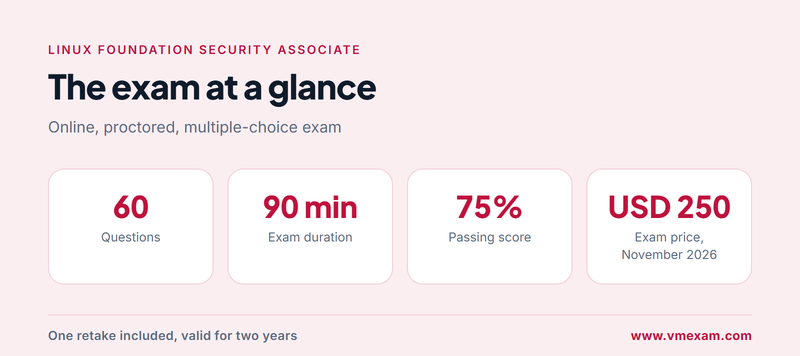
The Linux Foundation validates this knowledge with the Kubernetes and Cloud Native Security Associate exam. It is an online, proctored, multiple-choice exam with 60 questions and a 90-minute limit, and candidates need 75% to pass. The exam alone costs USD 250 as of November 2026, and there are no prerequisites. The foundation positions it as a beginner-level credential, which makes it a natural first security certification before hands-on exams.
The six domains and their weights tell you where the marks are. Cluster component security and security fundamentals together make up 44% of the exam, so they deserve the largest share of study time. The full weighting, as listed in the KCSA syllabus and study guide, is shown below.
| Domain | Weight |
|---|---|
| Overview of Cloud Native Security | 14% |
| Kubernetes Cluster Component Security | 22% |
| Kubernetes Security Fundamentals | 22% |
| Kubernetes Threat Model | 16% |
| Platform Security | 16% |
| Compliance and Security Frameworks | 10% |
Every registration comes with a second attempt at no extra charge, and the eligibility window to sit the exam is 12 months. Certification lasts two years from the pass date. For candidates who also want courses, the Linux Foundation pairs the exam with a THRIVE-ONE yearly subscription for USD 495, opening up its wider training catalogue. Exam rules and prices can change during the year, so confirm them on the Linux Foundation exam page before you buy.
Is there a Linux Foundation practice test for this exam?
The resources the Linux Foundation lists on its exam page are the curriculum, the candidate handbook, important instructions and frequently asked questions, which explain the rules and the testing environment rather than providing a question bank. The Kubernetes project's own documentation is the best free technical reference, especially the security concepts pages such as the Pod Security Standards documentation. The VMExam practice test is a separate, third-party resource with no Linux Foundation backing; it offers timed questions grouped by the six domains, each followed by a worked explanation.
A six-week plan for working professionals
Week one covers the overview domain: the 4Cs, cloud and infrastructure controls, isolation techniques and image security. Build a small practice cluster with kind or minikube so that every later topic can be tried rather than only read. Week two moves to cluster components; inspect the API server, kubelet and etcd configuration on your test cluster and match each setting to the risk it closes.
Week three is security fundamentals. Apply the Restricted pod security profile to a namespace and see which pods it rejects, write Roles and RoleBindings and test them with kubectl auth can-i, and build a default-deny network policy with allow rules. Week four is the threat model: take one application and walk through persistence, denial of service, network attacks, data access and privilege escalation, noting which control stops each step.
Week five covers platform security and compliance together: sign an image with cosign, run Trivy and kube-bench against your cluster, and read the CIS benchmark sections for the components you configured earlier. Week six is for timed practice. Sit full practice tests of 60 questions in 90 minutes, review every wrong answer against the documentation, and book the real exam only when your scores sit comfortably above the 75% mark in every domain rather than only on average.
Mistakes that cost candidates marks
The most common mistake is studying Kubernetes administration and assuming security will follow. Questions ask why a setting matters and what an attacker gains without it, not just which flag to set. Another frequent error is treating base64-encoded secrets as protected, or assuming a network policy works on any cluster regardless of the network plugin. Candidates also lose time on the compliance domain by trying to memorise every framework in depth, when recognising each framework's purpose is what the questions test.
After the associate credential, the usual next steps are hands-on. The Linux Foundation points candidates towards the Certified Kubernetes Administrator, and security specialists typically go on to the Certified Kubernetes Security Specialist, a performance-based exam that expects you to apply the controls described here on a live cluster under time pressure. The associate exam gives the vocabulary and the mental model; the hands-on exams prove you can use them.
FAQs
How many questions are on the Kubernetes and Cloud Native Security Associate exam?
Expect 60 multiple-choice items to answer within 90 minutes, which works out at about 90 seconds per question. Scenario items about threat models or pod security take longer than recall questions, so practise under a timer and learn to spot quickly which domain each question belongs to.
What score is needed to pass the Kubernetes security associate exam?
Candidates need 75% to pass, or about 45 correct answers out of 60. That leaves little room for a weak domain, so check your practice results domain by domain. Book the real exam once every domain, not just the overall average, is scoring comfortably above that mark.
How much does the Kubernetes and Cloud Native Security Associate exam cost?
The exam alone costs USD 250 as of November 2026. Candidates who want courses as well can choose the exam plus a yearly THRIVE-ONE subscription for USD 495, which opens the Linux Foundation's wider training catalogue. Prices and promotions change during the year, so check the figure on the checkout page when you buy.
Does the exam purchase include a retake?
Yes. The Linux Foundation lists one free retake with every registration, and both attempts must fall inside a 12-month eligibility window that starts when you buy. Plan to pass first time and keep the retake for problems such as illness, a connection failure or one domain that let you down.
How long does the Kubernetes and Cloud Native Security Associate certification stay valid?
The Linux Foundation sets a two-year validity period, counted from your pass date. When it runs out, sitting the exam again is how you renew. Record the expiry date when you claim your digital badge, so the credential on your profile does not lapse without you noticing it.
Does the Linux Foundation create the VMExam practice questions?
No. VMExam writes its own questions as a third party, without Linux Foundation involvement. They are timed, grouped by the six syllabus domains and each comes with a worked explanation. For the exam rules themselves, the Linux Foundation publishes a candidate handbook and important instructions on its exam page.
- KCSA Mock Test |
- KCSA Practice Exam |
- KCSA Prep Guide |
- KCSA Questions |
- KCSA Simulation Questions |
- KCSA |
- Linux Foundation KCSA Study Guide |
- KCSA Books |
- KCSA Exam Cost |
- KCSA Passing Score |
- Kubernetes and Cloud Native Security Associate |
- Linux Foundation Cybersecurity Certification |
- KCSA Kubernetes and Cloud Native Security Associate |
- Kubernetes and Cloud Native Security Associate (KCSA) Questions and Answers |
- Kubernetes and Cloud Native Security Associate Online Test |
- Kubernetes and Cloud Native Security Associate Mock Test |
- Linux Foundation Kubernetes and Cloud Native Security Associate Exam Questions |
- Linux Foundation Kubernetes and Cloud Native Security Associate Cert Guide |
- Kubernetes and Cloud Native Security Associate Certification Mock Test |
- Kubernetes and Cloud Native Security Associate Simulator |
- Kubernetes and Cloud Native Security Associate Mock Exam |
- Linux Foundation Kubernetes and Cloud Native Security Associate Questions |
- Linux Foundation Kubernetes and Cloud Native Security Associate Practice Test


